HR Reports in Doezze: Performance Reviews Backed by Real Work Data
Doezze HR Reports turn delivery, time-tracking, leave and recognition data into eight ready-to-use reports for review cycles — with time windows and one-click CSV export.
Most performance review software is very good at collecting opinions and very poor at collecting evidence.
A cycle opens, forms go out, managers write a paragraph from memory, ratings land somewhere in the middle, and the conversation ends. Nobody in that chain can answer the questions HR actually gets asked afterwards: who is behind on their reviews, who carried the delivery load this quarter, who has been quietly overloaded, and which ratings are supported by anything other than recall.
Doezze HR Reports were built to close that gap. They sit inside Review Management and read the work data the platform already holds — tickets, story points, time tracking, leaves and recognition points — and turn it into eight reports that HR and managers can open, read and export during a review cycle.
The problem with review data in most tools
Review data usually lives in three disconnected places.
The delivery data is in the project tool. The attendance and leave data is in an HR system. The review forms are in a third product. When a calibration meeting starts, someone has to manually reconcile all three, usually the night before, usually in a spreadsheet.
The result is predictable. Ratings drift towards whoever was most visible. Recency bias wins. Quiet, reliable contributors get average scores. Overloaded people get penalised for slipping deadlines that were never realistic. And when an employee disputes a rating, HR has no auditable trail to point to.
The fix is not more forms. The fix is making the work data available in the same place the review happens.
What HR Reports gives you
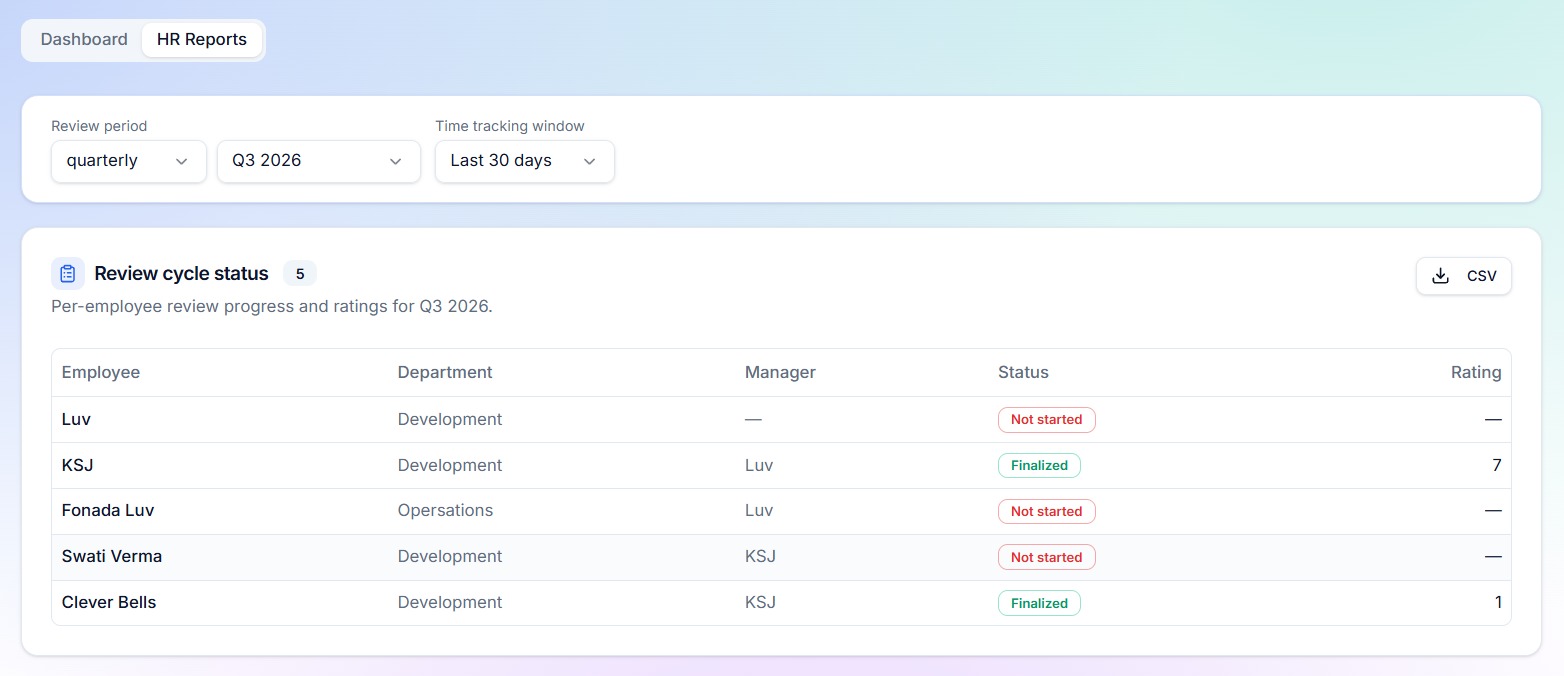
HR Reports is a dedicated tab inside Review Insights, available to Admins and Owners. Two controls sit at the top:
- Review period — monthly, quarterly or yearly, following your workspace's configured financial year start
- Time-tracking window — last 7, 14, 30, 60 or 90 days
Every report respects those controls, every report shows a live count of matching rows, and every report has a Download CSV button so the data can go straight into a calibration deck or an HRIS import.
Below is what each report answers.
1. Review cycle status
The operational one. Every active member of the workspace, with department, reporting manager, the state of their review for the selected period, and the final rating if one exists.
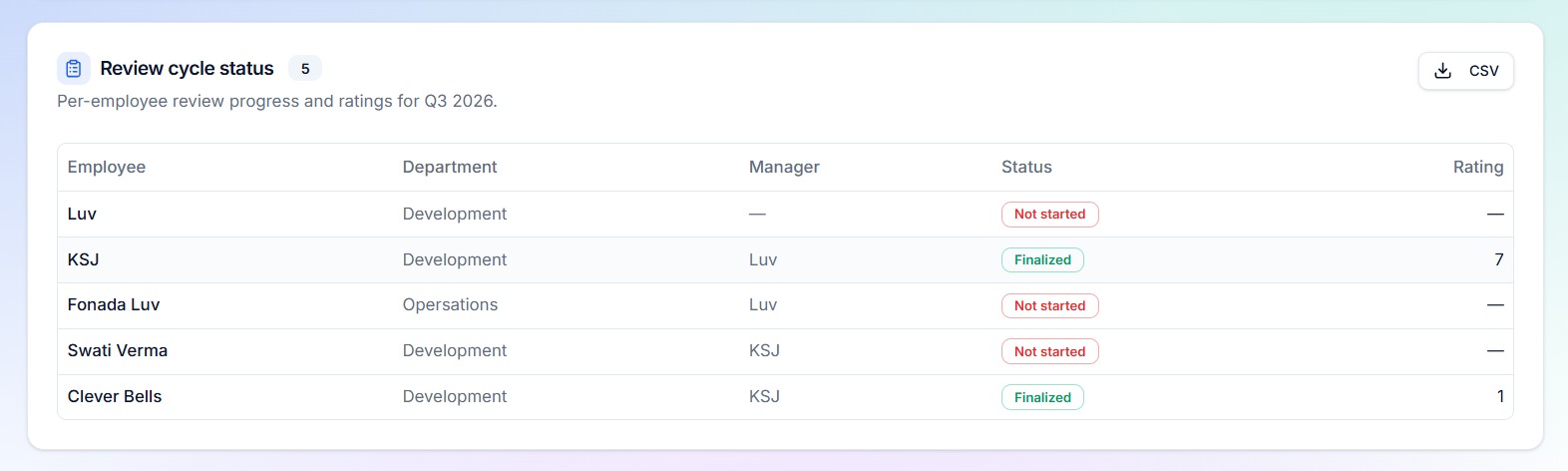
States are explicit: Not started, Awaiting self-review, Awaiting manager, Finalized. HR stops chasing the whole company and starts chasing the four people who are actually blocking the cycle.
2. Active hours lower than idle hours
Pulled from Doezze Time Tracker. It lists people whose recorded active time over the selected window is below their idle time, with the gap in hours and the number of days tracked.
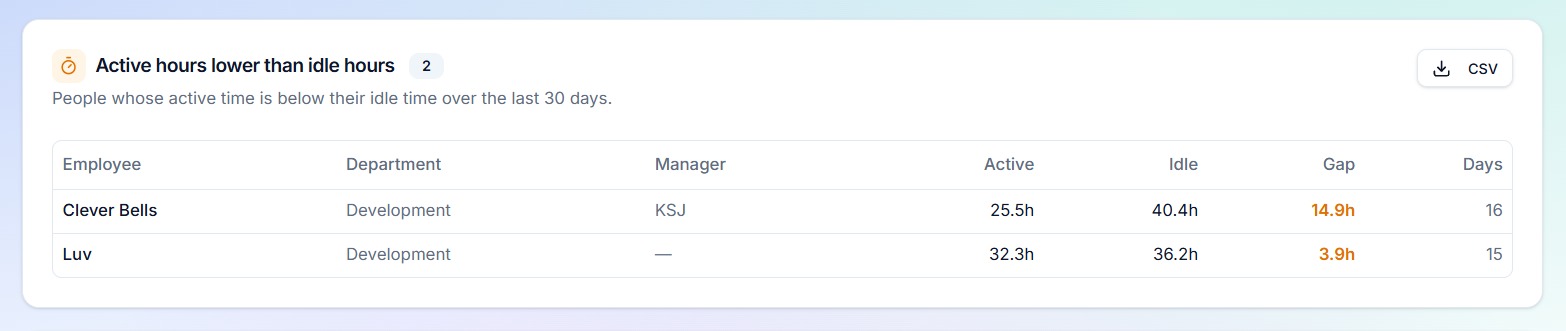
This one deserves care in how it is read. A large idle gap is a signal to have a conversation, not a verdict. It frequently surfaces process problems rather than people problems — someone stuck waiting on approvals, an engineer blocked on an environment, a support agent sitting in meetings that were never scheduled as work.
3. Active hours lower than input (expected) hours
The same data compared against expected working hours rather than idle time. It shows active hours, expected hours, the shortfall, and days tracked.
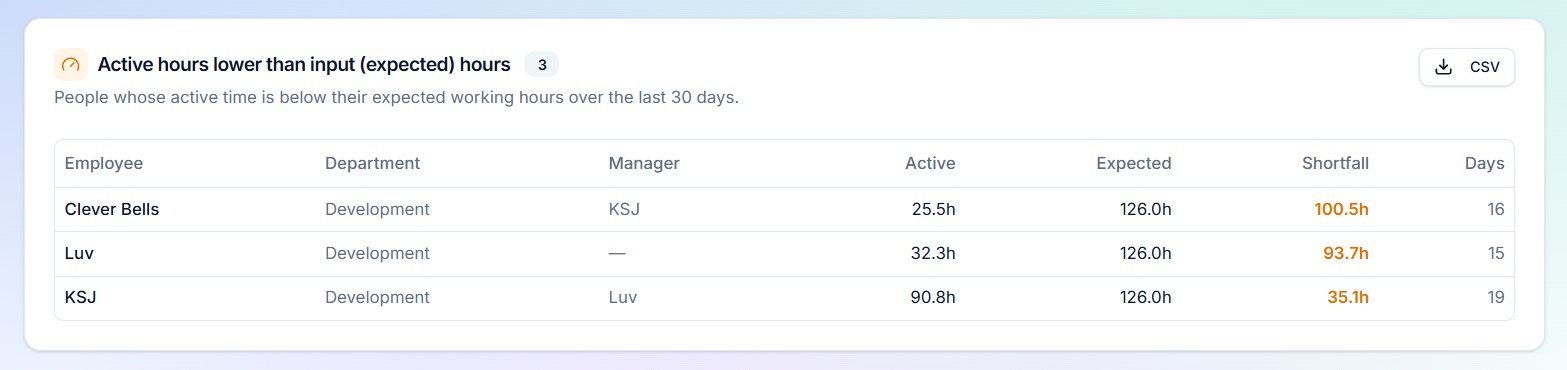
Useful for spotting genuine under-utilisation, but equally useful in reverse: consistent shortfalls across an entire department are usually a staffing or tooling issue, not a motivation issue.
4. Overdue tickets
Every open ticket past its due date, with ticket number, title, project, assignee, department, status, priority, due date and days overdue.
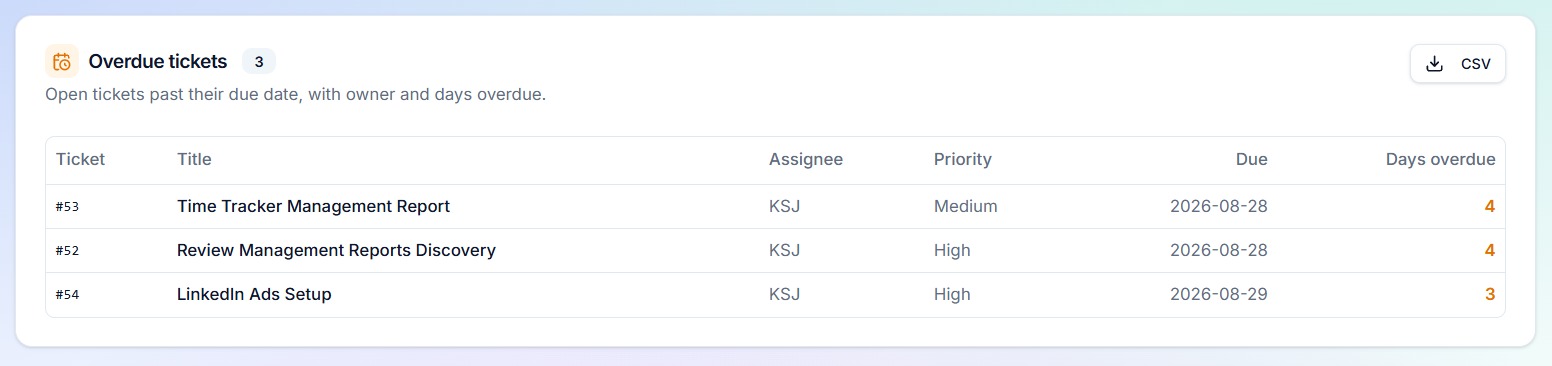
In a review context, this is the counterweight to a rating written from memory. It shows exactly what is late, who owns it, and how late it is — before anyone claims that everything is on track.
5. Story points completed by user
Completed work in the selected window, aggregated per person: total story points and number of tickets closed, sorted highest first.
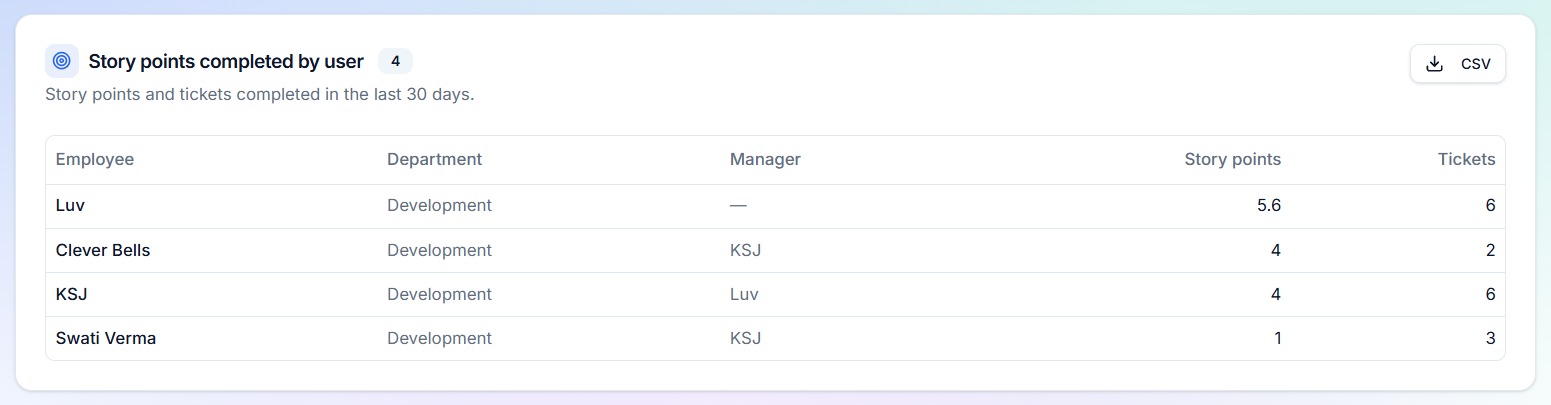
Story points are not a performance score and should never be used as one in isolation — estimation cultures differ between teams. What this report does well is expose distribution. When two engineers on the same squad differ by a factor of four, that is a conversation about load balancing, scope or estimation hygiene, and it is far better to have it during the cycle than after it.
6. Leave counts by user
Leave days in the selected window per person, with a breakdown by leave type.
Its most important role in a review is context. Delivery numbers read very differently once you know someone was out for twelve days. Without this column sitting next to the delivery reports, capacity gets misread as effort.
7. Appreciation points by user
Recognition points awarded during the window, with totals and the number of times each person was recognised.
Recognition in Doezze is given at ticket level by teammates and managers throughout the cycle. Aggregating it turns scattered moments of appreciation into evidence — the kind that supports a promotion case far better than a paragraph written the week the form was due.
8. Penalty points by user
The counterpart: penalty points recorded during the window, with totals and counts.
Kept deliberately separate from appreciation so that the two are never silently netted off. A person can have both, and both belong in an honest conversation.
Why this makes reviews defensible
There is a practical difference between a review that says "delivery was inconsistent this quarter" and one that says "eleven tickets closed for thirty-four points across the quarter, six overdue at an average of nine days late, twelve days of approved leave in the same period, and four appreciations from three different teammates."
The first is an opinion. The second is a conversation both sides can work with.
That is the entire design intent of HR Reports:
- Evidence over recall. The numbers were recorded as the work happened, not reconstructed at the end.
- Context alongside output. Leave, load and recognition sit next to delivery, so output is never read in isolation.
- Consistency across managers. Every manager calibrates against the same reports, which narrows the rating spread between generous and strict reviewers.
- An audit trail. When a rating is questioned, the underlying data is one CSV away.
Practical notes
Access. HR Reports is restricted to Admins and Owners. Individual contributors see their own review and productivity insights on their profile, not the workspace-wide reports.
Time-tracking dependency. Reports 2 and 3 require the Doezze Time Tracker agent. If a workspace has no tracking data, those two cards state that clearly instead of showing empty tables — the other six reports work regardless.
Exports. Every download is a clean CSV with employee, email, department and manager columns included, so the file can be pivoted or joined without further cleanup.
Windows. The review period and the time-tracking window are independent on purpose. A quarterly review often needs a 90-day delivery view but a 30-day productivity view to reflect the current state of the team.
How to run a cycle with it
A workflow that works well in practice:
- Open the cycle and check Review cycle status weekly. Chase only what is blocked.
- Before calibration, export story points, overdue tickets, leave counts and appreciation points for the period.
- Bring the four exports into the calibration meeting. Ratings that cannot be supported by any of them get discussed, not defended.
- Use active vs idle and active vs expected as conversation starters with managers, never as a rating input on their own.
- Finalise, and keep the exports attached to the cycle as the record of what informed it.
Reviews stop being an annual writing exercise and become a summary of what the team already did — which is what they were supposed to be.
Try it
HR Reports is part of Review Management in Doezze, alongside review cycles, goals, competencies and productivity insights. Every Doezze workspace gets one month free with five seats and no credit card.
Weiterlesen
How AI Eases the Project Manager's Day: Inside Doezze's AI Features
A practical look at how Doezze AI helps project managers, founders, and agency owners: AI planning, sprint prediction, semantic memory, and MCP integrations.
ComparisonBuilt-In Sprint Prediction: Know How Your Sprint Ends Before It Ends
Doezze Sprint Prediction helps teams forecast whether an active sprint is on track, delayed, overlapping, or at risk before the sprint ends. It analyzes burn rate, remaining work, team capacity, workload, leaves, delayed tickets, and overlapping assignments to identify potential risks early. With AI-powered risk scoring and regular prediction updates, teams can make informed decisions, balance workloads, and take corrective action before sprint delays impact deadlines.