
Built-In Sprint Prediction: Know How Your Sprint Ends Before It Ends
Doezze Sprint Prediction helps teams forecast whether an active sprint is on track, delayed, overlapping, or at risk before the sprint ends. It analyzes burn rate, remaining work, team capacity, workload, leaves, delayed tickets, and overlapping assignments to identify potential risks early. With AI-powered risk scoring and regular prediction updates, teams can make informed decisions, balance workloads, and take corrective action before sprint delays impact deadlines.
Burndown charts and velocity tell you what has already happened. But knowing the past is not enough to manage a sprint successfully. Teams need to know where the sprint is heading, whether the current workload can be completed on time, and where problems may appear before they become delays.
That is where Doezze Sprint Prediction comes in.
Sprint Prediction gives teams a forward-looking forecast of their active sprint. It analyzes the current work, team capacity, ticket progress, delays, overlapping assignments, leaves, and other sprint conditions to predict whether the sprint is on track, delayed, overlapping, or at risk.
What Is Sprint Prediction?
Sprint Prediction is a forecasting feature in Doezze that helps teams understand how their current sprint is likely to end.
Instead of looking only at completed work, it looks at the relationship between remaining work and the team's available capacity.
The prediction considers factors such as:
- Current burn rate versus remaining work
- Delayed or stuck tickets
- Overlapping assignments
- Team member leaves
- Team capacity versus workload
- Sprint progress and remaining time
- Story points and ticket distribution
- AI-based risk scoring
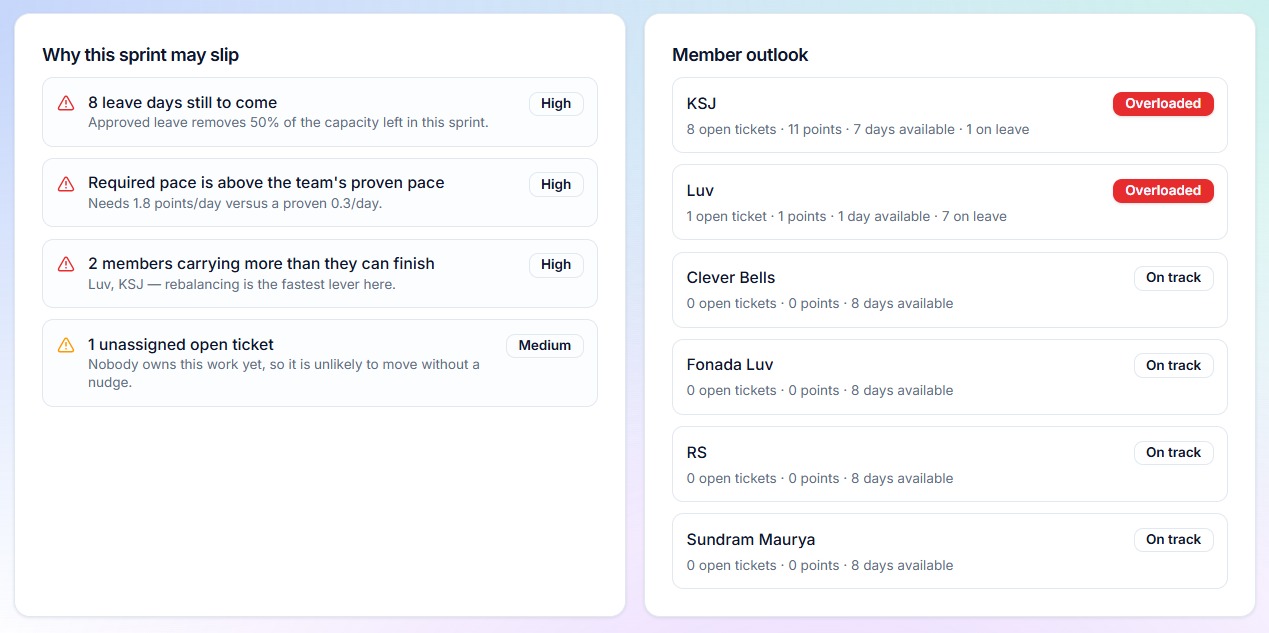
The prediction is refreshed every four hours, giving teams an updated view of the sprint without requiring them to manually analyze multiple reports.
The goal is simple: know about a potential sprint problem while there is still time to fix it.
Why Do Teams Need Sprint Prediction?
Sprint delays rarely happen suddenly.
A sprint may look healthy at the beginning, while small problems slowly build up. A ticket remains stuck for several days. A team member goes on leave. Several high-effort tickets are assigned to the same person. New work overlaps with existing commitments. The team's actual burn rate starts falling behind the amount of work that needs to be completed.
By the time the problem becomes obvious in a traditional report, there may be only a few days left in the sprint.
That is when teams start making difficult decisions.
Scope gets cut at the last minute. Developers work overtime. Weekend work becomes necessary. Important commitments are pushed into the next sprint.
Sprint Prediction changes this approach by identifying potential problems earlier.
If the system detects that the current pace is unlikely to complete the remaining work within the sprint, the team can react while there is still time.
They can redistribute work, address blocked tickets, adjust assignments, review scope, or take other corrective actions before the sprint reaches its final days.
What Most Tools Give You Today
Most project and agile tracking tools are very good at showing teams what has already happened.
You can usually find burndown charts that show completed versus remaining work. Velocity reports can show historical team performance. Capacity may be managed through spreadsheets or manual calculations.
These reports are useful, but they often require teams to interpret the information themselves.
Some forecasting capabilities may be available through paid plugins or marketplace applications. More advanced analytics may require separate BI tools, data warehouses, or additional reporting systems.
AI is also increasingly available, but it is often provided as a separate assistant rather than as a prediction system that continuously understands the current sprint.
This creates a gap.
Teams have the data, but they still need to connect the dots.
They need to look at the sprint, tickets, workload, capacity, leaves, and progress and then determine what all of that means for the sprint's future.
How Doezze Is Different
Doezze takes a different approach.
Sprint Prediction is built directly into the workspace rather than being added as a separate analytics layer.
The prediction can use information that already exists inside Doezze, including tickets, sprint data, team leaves, time tracking, workload, and story points.
There is no need to connect another forecasting platform or manually move data into a spreadsheet.
| Typical Setup | Doezze |
|---|---|
| Burndown and velocity reviewed separately | Sprint forecast combines multiple sprint signals |
| Capacity often calculated manually | Team capacity is considered automatically |
| Delays discovered through manual analysis | Delayed and stuck work contributes to the prediction |
| Leaves may require separate planning | Team availability is considered |
| Forecasting may require additional tools | Sprint Prediction is built into Doezze |
| AI may exist as a separate assistant | AI contributes directly to sprint risk analysis |
| Manual review required | Prediction refreshes every four hours |
The result is a more practical view of sprint health: not just what happened, but what is likely to happen next.
How Sprint Prediction Works Inside Doezze
Sprint Prediction is designed to fit directly into the existing sprint workflow.
When you open the Sprint Prediction area, you can see your sprints along with their latest computed prediction values.
For an active sprint, you can open the prediction details to understand its current forecast.
The detail view provides information such as the sprint's risk score, projected burndown, and AI outlook.
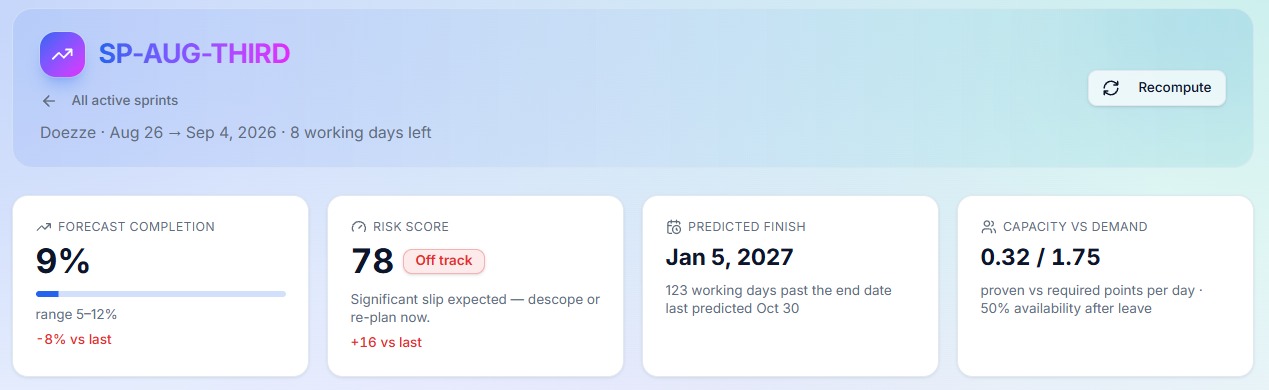
Risk Score
The risk score provides a quick indication of how likely the sprint is to face problems.
Instead of requiring managers to analyze multiple numbers individually, the score provides a simplified view of the overall sprint condition.
Projected Burndown
The projected burndown helps compare the expected pace of work against the amount of work remaining.
This gives teams a forward-looking view rather than simply displaying historical progress.
AI Outlook
The AI outlook provides additional context around the prediction.
It can help explain why a sprint may be moving toward a particular state and highlight factors that deserve attention.
View Prediction and Recompute
Doezze provides two different actions for managing prediction information.
View Prediction allows users to see the latest available forecast.
Recompute allows an authorized administrator or owner to refresh the prediction when needed.
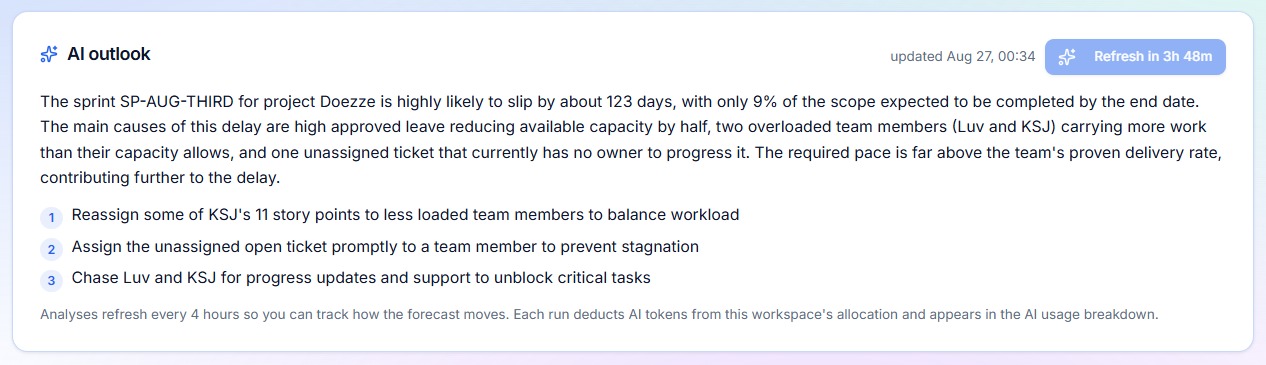
The system also maintains four-hourly prediction snapshots, allowing the sprint forecast to be updated regularly as work progresses.
Prediction refreshes are controlled to prevent unnecessary computation, while AI usage is managed through token metering.
How to Read the Four Sprint States
Doezze Sprint Prediction provides four key states to make sprint health easier to understand.
1. On Track
An On Track sprint indicates that the current progress and available capacity suggest the team should be able to complete the planned work within the sprint.
This does not mean the team should stop monitoring the sprint.
The recommended action is to continue with the current plan and monitor the prediction as the sprint progresses.
2. Delayed
A Delayed sprint indicates that the current pace is falling behind what is required to complete the planned work on time.
This may happen because tickets are taking longer than expected, progress has slowed, or remaining work is too high compared with the available time.
The recommended action is to identify the work causing the slowdown and take corrective action early.
3. Overlapping
An Overlapping sprint indicates that workload or assignments are creating conflicts within the available team capacity.
For example, a team member may have multiple assignments competing for the same period, creating a workload concentration that could affect sprint completion.
The recommended action is to review assignments and redistribute work where necessary.
4. At Risk
An At Risk sprint indicates a higher level of concern.
The current combination of workload, progress, capacity, delays, availability, or other factors suggests that the sprint may not finish successfully without intervention.
The recommended action is to act immediately.
Review the remaining scope, blocked or delayed tickets, assignments, capacity, and team availability before the sprint reaches its final stage.
From Sprint Reporting to Sprint Forecasting
Traditional sprint reporting answers questions such as:
How much work have we completed?
What was our velocity?
How much work remains?
These are important questions, but they describe the current or past state of the sprint.
Sprint Prediction adds another question:
Where is this sprint heading?
That difference matters.
A team that knows a sprint is likely to fail one day before its deadline has very few options.
A team that knows the same sprint is trending toward failure several days earlier has much more room to respond.
That is the real value of forecasting.
It gives teams time to act.
Make Sprint Decisions Before It Is Too Late
Sprint management should not be about waiting for a burndown chart to show a problem.
It should be about recognizing the signals that appear before the problem becomes unavoidable.
Doezze Sprint Prediction brings those signals together and turns them into a simple forecast of the sprint's future.
Instead of manually checking tickets, capacity, leaves, workload, and progress across different places, teams can use one prediction to understand the overall direction of their sprint.
See where your sprint is going before the sprint is over.
Start using Doezze and get your 1-month free trial at Doezze.com.
Frequently Asked Questions
What is Sprint Prediction in Doezze?
Sprint Prediction forecasts the likely outcome of an active sprint by analyzing factors such as remaining work, burn rate, capacity, delays, overlapping assignments, leaves, and workload.
How often is the sprint prediction updated?
Doezze refreshes sprint prediction data every four hours, providing an updated view as sprint conditions change.
What are the four Sprint Prediction states?
The four states are On Track, Delayed, Overlapping, and At Risk. Each state represents a different sprint condition and helps teams understand when action may be required.
Does Sprint Prediction require another tool or integration?
No. Sprint Prediction is built into Doezze and uses data already available within the workspace, including sprint, ticket, workload, capacity, leave, time-tracking, and story-point information.
Weiterlesen
How AI Eases the Project Manager's Day: Inside Doezze's AI Features
A practical look at how Doezze AI helps project managers, founders, and agency owners: AI planning, sprint prediction, semantic memory, and MCP integrations.
Feature GuideHR Reports in Doezze: Performance Reviews Backed by Real Work Data
Doezze HR Reports turn delivery, time-tracking, leave and recognition data into eight ready-to-use reports for review cycles — with time windows and one-click CSV export.